Happy Halloween - 3D Layered SVG: What to Know Before You Buy, Download, or Create
If you have browsed craft marketplaces or design resource sites recently, you have likely seen the striking, dimensional look of a well-made Happy Halloween - 3D Layered SVG file. These digital designs allow you to cut layered materials—cardstock, vinyl, or even thin wood—and stack them to create a shadow-box effect that pops off the page. The appeal is obvious: a flat piece of paper transforms into something that feels almost sculptural, capturing the spooky charm of the season with depth and texture. But as with any specialized digital product, there are subtle pitfalls that can turn an exciting project into a frustrating waste of time and materials. Let's look at what this design is, where people often go wrong, and how you can get the best result every time.
What Exactly Is a 3D Layered SVG for Halloween?
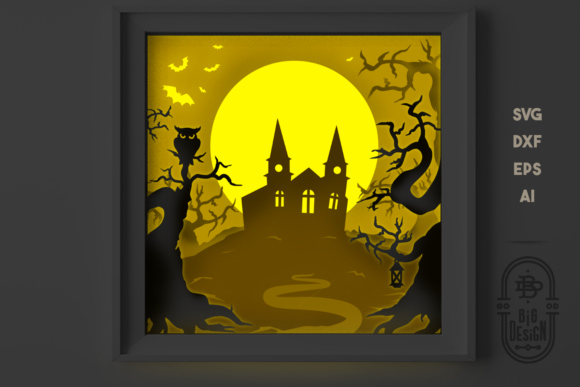
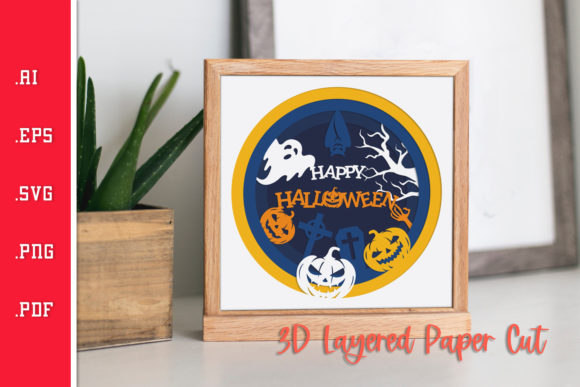
At its core, a Happy Halloween - 3D Layered SVG is a set of vector cut files, each representing a distinct layer of an overall scene. Typically, you will find between three and seven layers. The back layer is the largest and often includes the background elements—a moon, a graveyard, or a haunted house silhouette. Each subsequent layer is slightly smaller, adding elements like bats, pumpkins, witches, or lettering. When stacked using foam adhesive or other spacers, the layers create a shadow-box effect that gives the design a genuine sense of depth. The result is a dimensional decoration that looks far more sophisticated than a simple printed poster or a single-layer cutout.
People gravitate toward these files for a few practical reasons. They offer a structured project for hobbyists who enjoy papercraft. They provide a marketable product for small business owners who sell handmade goods at seasonal fairs or online shops. And they give educators and classroom volunteers a visually impressive activity that older students can assemble with patience and care. But the ease with which you can find hundreds of these files online hides the fact that not all designs are created equal, and not every buyer knows what to check before hitting the download button.
Common Mistake Number One: Choosing a File with Poor Layer Separation
The most frequent frustration I hear from papercrafters is this: they purchase a Happy Halloween - 3D Layered SVG that looks glorious in the seller's mockup, but when they open it in their cutting machine software, the layers seem muddy or incomplete. Small details meant to be cut out, like the slits in a jack-o'-lantern's face or the gaps between tree branches, are either missing or too narrow for the material thickness.
What Goes Wrong
This typically happens when a designer simply takes a flat image, runs it through an auto-trace tool, and exports the results as separate layers without human review. The tool may create tiny islands of color that are hard to cut, or it may merge elements that should remain separate. You end up with a design that looks right on screen but fails in the machine.
How to Avoid This
Before you buy, look for user reviews that mention "clean cuts" or "well-organized layers." Search for photos of actual finished projects, not just the seller's digital mockups. If the listing shows a physical photo of the assembled piece on a table or wall, that is a strong sign the file has been test-cut. Also, check the file formats provided. A reputable seller will often include SVG, DXF, PNG, and sometimes PDF versions, along with a reference guide that shows which layer goes where.
Common Mistake Number Two: Overlooking Material Compatibility
Another error that costs time and money is assuming that every Happy Halloween - 3D Layered SVG works equally well with all cutting machines and all thicknesses of material. A design that cuts beautifully through standard 65 lb cardstock may become a shredded mess if you try to run it through a machine with 80 lb paper or, worse, glitter cardstock.
Why This Matters
Thicker materials require wider gap spacing between cut lines. If you want to use kraft board, chipboard, or metallic cardstock, you need a design where the designer has accounted for that additional width. Otherwise, what should be a clean pumpkin outline becomes a jagged tear, and you waste a sheet of expensive material.
The Better Approach
Look at the listing's specifications. Does the seller mention recommended materials? They should. If the description says "designed for standard cardstock," then you should treat that as a warning not to use anything heavier without first testing a small area. Alternatively, you can adjust the cut settings yourself—reduce pressure or increase the blade depth—but that only compensates so much. A well-constructed SVG file will have slightly wider gaps between elements that are meant to stay separate, especially in the middle and foreground layers where fine details like spider legs or broomsticks appear.
Common Mistake Number Three: Ignoring the Assembly Instructions
Even experienced crafters sometimes skip the step of reading the assembly guide that comes with a Happy Halloween - 3D Layered SVG file. They assume they can figure out the stacking order by looking at the preview image. That assumption is risky because many 3D layered designs use an intentional offset—some layers are meant to sit slightly forward or backward relative to others, and the order is not always intuitive.
Realistic Example
I have seen someone stack the background moon layer on top of the foreground tree layer because they thought the moon should be in front. The result collapsed the shadow effect and made the whole piece look flat. A simple one-page instruction sheet, often included as a PDF, would have shown them which layer is base, which is middle, and which is top. It would also tell them whether to use foam tape, double-sided adhesive, or glue dots, and which thickness works best for that specific design.
Advice for Success
Open the instruction file immediately after downloading. If one is not included, that is a red flag. A conscientious seller knows that even advanced crafters benefit from a stack-order diagram. If you are buying from a marketplace that allows direct messages, ask the seller for a screenshot of the layer arrangement before you purchase. You will save yourself a lot of trial-and-error assembly.
Common Mistake Number Four: Misunderstanding Licensing for Commercial Use
Small business owners and entrepreneurs often turn to Happy Halloween - 3D Layered SVG designs to create products they can sell at craft fairs or on Etsy. But many do not read the fine print about what the license actually covers. A standard "personal use" license means you can make items for yourself and maybe for gifts, but you cannot sell the finished physical product. An "extended commercial license" or "small business license" allows you to produce and sell a limited number of physical items, but still prohibits you from reselling the digital file itself.
Why This Gets Messy
If you sell a hundred Halloween shadow boxes using a file that only includes personal use rights, you could face a take-down notice or even a legal claim from the designer. That is an expensive and avoidable mistake. I have seen makers lose access to shops and get negative reviews because they assumed all SVG downloads were free for commercial use.
How to Stay in the Clear
Always check the license section of the listing before you purchase. Look for terms like "commercial use allowed," "unlimited sales," or "up to X units." If you cannot find clear terms, contact the seller. Most will respond quickly because they want satisfied customers. Keep a copy of the license file with your purchase records. This small step protects your business and respects the designer's work.
Common Mistake Number Five: Not Testing the File Before Cutting Final Materials
This is a mistake that spans beginners and seasoned crafters alike. You find a beautiful Happy Halloween - 3D Layered SVG, you load your cutting machine with a brand new sheet of premium paper, and you hit "cut" without previewing the file or testing a small batch. When the machine finishes, you discover that the registration marks are off, the layers are misaligned, or the design requires more mat space than you assumed.
The Cost of Skipping a Test Cut
You waste not only the paper but also the adhesive, the foam spacers, and the time you spent cutting. If you are making multiple pieces for a market or a classroom project, one flawed test can cascade into a batch of unusable products. The frustration can make you abandon the entire project.
Practical Habit to Develop
Always do a quick test cut on scrap paper before you commit to your final material. Use the same type of paper or cardstock you plan to use, even if it is a leftover sheet. Adjust the blade depth, pressure, and speed until the cuts are clean and the small details release from the mat without tearing. Only then should you move to your good material. This approach takes an extra ten minutes but saves you the cost of wasted sheets and the disappointment of a failed project.
What to Look for Before You Buy
Before you add a Happy Halloween - 3D Layered SVG to your cart, take a moment to evaluate the listing from a practical standpoint. Look for high-resolution preview images that show each layer separately, not just the final stacked result. Read the description to confirm the number of layers, the recommended material thickness, and the compatible software and machine types. Check the format list: SVG, DXF, PDF, and PNG are the most common, and having all four guarantees you can use the file on most machines without conversion errors. Finally, verify that the seller provides a way to contact them if you run into problems. Responsive customer support is a sign of a seller who cares about their product.
Final Thoughts on Getting the Best Result
A well-made Happy Halloween - 3D Layered SVG can be a joy to work with. It turns a simple craft session into a creative experience that results in a genuinely impressive piece of decor. But the quality of that experience depends heavily on the choices you make before you start cutting. By selecting a file with clean layer separation, reading the material guidelines, reviewing the assembly instructions, respecting the license, and testing before cutting final material, you set yourself up for success. Whether you are creating one for your own mantle or fifty for a seasonal market, these practical checks ensure that your Halloween project delivers exactly the depth and beauty you envisioned.